Recent Updates
Track all the latest features, improvements, and fixes for Video Weaver.
Sep 29, 2026
Version 1.0.29
This release adds new AI tools for videos and images, makes captions and timeline editing easier, and improves playback and media handling. We’ve also refreshed the website and tutorials.
Features & Changes
- Remove video backgrounds with AI so you can use the subject on its own.
- Repair images by removing unwanted objects and filling in the area, or enlarge images up to 4×.
- The caption tools can turn speech into editable subtitles, describe what appears on screen, and recognize subtitles already in a video.
- Track faces with mosaic blur so the blur follows a moving person.
- Create a talking-avatar video from a portrait and an audio clip when a local voice service is connected.
- Keep related clips together, add notes, and select part of your project to focus your edits.
- Delete several media items from the library at once to clean up projects faster.
- Move and resize timeline clips more easily, and use shortcuts to zoom and pan around the canvas.
- Video enhancement now lets you choose between faster processing and more detail, and shows the video size before and after processing.
- AI tools speed up automatically on supported devices and remain available in standard mode on others.
- The homepage and English and Traditional Chinese tutorials now explain features and steps more clearly.
- Improved playback, thumbnails, and audio exports. Videos can keep previewing even when their audio cannot be played.
Version 1.0.28Sep 27, 202612 changes
Added grouped timelines, quick tools for selected clips, subtitle tracks, more fonts, voice generation, and plugin support, along with editing and export improvements.
Features & Changes
- Group related clips in a nested timeline to keep larger projects organized.
- Open common tools directly from a selected clip to make quick adjustments.
- Arrange subtitles on their own track and add text notes to timeline markers.
- Manage fonts and choose from a larger library for titles and subtitles.
- Use a new text-to-speech service for more voice options.
- Connect the Scribis voice tools through the new plugin support.
- Save your workspace with Ctrl+S (Cmd+S on Mac).
- Improved the interface for right-to-left languages.
- Improved upload and preview support for transparent MOV videos.
- Improved audio export and preview compatibility in Safari.
- Improved recording noise reduction and support for split audio files.
- Kept the original pitch when changing video playback speed.
Version 1.0.27Jun 22, 20267 changes
This update brings timeline scrolling, expanded multi-language support (50 languages), audio speed adjustments without pitch changes, and various under-the-hood improvements.
Features & Changes
- Consolidated recent hotfixes (1.0.26-1 to 1.0.26-4) for better stability.
- Added Supertonic Text-to-Speech (TTS) service.
- Added mouse wheel scrolling support to the timeline.
- Expanded application support to 50 languages.
- Adjusting audio speed no longer changes the pitch of the sound.
- Improved file conversion to automatically handle proper audio formats (like AAC or Opus) based on the video type.
- Updated the Gemini watermark.
Version 1.0.26Feb 27, 20261 changes
Fixed several known issues and improved system stability.
Features & Changes
- Fixed several bugs and improved performance
Version 1.0.25Jan 14, 20263 changes
Introduced a new API Gateway service for Pixabay and Tenor searches and added the powerful SAM2 smart segmentation tool. Also included an important notice regarding Tenor API deprecation.
Features & Changes
- Added API Gateway service, enabling Pixabay and Tenor searches directly without requiring a private API key.
- Tenor API Deprecation Notice: Tenor has frozen new registrations, and the service will be permanently discontinued on June 30, 2026.
- Added SAM2 (Segment Anything Model 2) smart segmentation, enabling high-precision object selection and background removal with simple clicks.
Version 1.0.24Jan 9, 20267 changes
This update brings a redesigned Project Settings UI, a new Audio Denoiser, and significant mobile optimizations. It also includes fixes for canvas rendering, dialog layout, and thumbnail generation robustness.
Features & Changes
- Optimized canvas refresh on mobile devices to prevent redundant regeneration and improve performance.
- Tools now support choosing between clip selection and file upload; fixed Audio Keyframes showing incorrect templates.
- Added Audio Denoiser tool to reduce background noise.
- Migrated all system notifications to a new, consistent Toastr design.
- Fixed Alert Dialog title overflow, missing thumbnails on split clips, and stretched Dialogs on mobile.
- Refactored Project Settings UI for better organization and usability.
- Fixed an issue where thumbnails for the second part of a split clip were not re-fetched after restart.
Version 1.0.23Jan 8, 202613 changes
This update introduces new visual tools like Pen, Path, and Cursor animations, enhances zoom/pan capabilities, adds speaker diarization, fixes Android playback issues, and includes more effects and assets.
Features & Changes
- Fixed issues with zoom preview and 3D text clips not recovering size when reset.
- Corrected thumbnail generation for the first segment after splitting a clip.
- Added visual controls for Zoom, Pan, and Crop; fixed mask positioning.
- Added options for Border Radius (rounded corners).
- Fixed an issue where 'Solo' mode failed to hide text/images from other tracks.
- Expanded the library of Audio Effects.
- Added more Intro and Outro animations.
- Introduced progress markers and window splitting by group.
- Added Pen tool, Cursor & Mouse animations, and Path functionalities.
- Added a collection of Wallpapers.
- Added more Mosaic effect types.
- Implemented Speaker Diarization support.
- Resolved video stuttering on Android by adding software decoding support.
Version 1.0.22Jan 1, 202614 changes
🎉 Happy New Year! This update refactors Crop and Zoom Pan features into the keyframe system, adds track Lock/Mute/Solo controls, optimizes timeline interactions, and fixes several critical issues.
Features & Changes
- Fixed keyframe 3D rotation rendering issues on the timeline.
- Added Clip Group Mode, allowing you to manipulate multiple clips simultaneously.
- Added keyboard shortcuts for frame-by-frame navigation forward/backward and go to start/end.
- Optimized timeline zoom and resize interactions.
- Added track Lock, Mute, and Solo controls.
- Added In/Out point functionality in the timeline.
- Canvas now synchronizes movement for all objects within a group.
- Effect panel now displays additional media information.
- Fixed undo functionality issues after multiple delete operations.
- Thumbnails are now regenerated when restoring deleted clips.
- Refactored Crop and Zoom Pan features and integrated them into the keyframe system.
- Fixed an issue where keyframes were not rendering in real-time when adjusting filters.
- Fixed a bug where applying preset filters would cancel stylization effects.
- Updated UI for timeline, video editor, and toolbar.
Version 1.0.21Dec 12, 20255 changes
This update significantly enhances color correction capabilities with a revamped Color Wheel interface, LUTs support, and new grading templates. We've also fixed multi-cam synchronization accuracy, editing errors for specific video formats, and inverted 3D image display issues.
Features & Changes
- Completely redesigned Color Wheel tools and added various professional color grading templates.
- Added support for LUTs (Look-Up Tables) and a built-in LUT maker for diverse color styling.
- Fixed an issue where splitting and merging failed for video formats other than MP4 and MOV.
- Fixed time synchronization calculation errors in Multi-Cam editing mode.
- Fixed a bug where images applying 3D effects appeared upside down under WebGL rendering.
Version 1.0.20Dec 09, 20255 changes
This update brings a wider range of visual effects and animations, including new text animations (like Karaoke), more entrance/exit effects, and default keyframe templates. We've also introduced WebGL to support powerful filters and 3D effects, and fixed Lottie animation display issues.
Features & Changes
- Fixed an issue where Lottie animations were not displaying correctly on the canvas.
- Added more entrance and exit animations to make your video transitions more dynamic.
- Introduced new text animations, including Karaoke and Glow effects.
- Added default keyframe templates, allowing you to apply professional animations with a single click.
- New WebGL engine support for complex filters, effects, and 3D capabilities, significantly enhancing visual quality.
Version 1.0.19Dec 08, 20253 changes
This update introduces basic color grading and expanded export options, along with fixes for the Deface tool's ghosting issues and its conflict with cropping.
Features & Changes
- Fixed an issue where the Deface tool caused ghosting/artifacts and resolved a conflict when using it with crop.
- Added basic color grading tools, allowing you to tweak video colors.
- Expanded export options with support for more resolutions and file formats.
Version 1.0.18Dec 01, 20255 changes
This version merges the desktop version codebase and introduces the 'Deface' tool for face blurring. It also adds thumbnail support to the media library and enables PWA offline caching. Please contact us if you encounter any bugs.
Features & Changes
- Added "Deface" tool for automatic face blurring in videos.
- Added thumbnail view support for the Media Library.
- Enabled PWA offline caching for better reliability.
- Fixed an issue where the bottom of the media list was cut off on mobile devices.
- Fixed a bug where applying entrance or exit animations caused audio loss.
Version 1.0.17Nov 29, 20252 changes
Fixed playback rate application rules for preview versus export and upgraded the storage engine for text style templates.
Features & Changes
- Fixed playrate rules: Playback rate is now applied during live preview but will consistently not be applied during export.
- Migrated text style templates from LocalStorage to IndexedDB for improved storage capacity.
Version 1.0.16Nov 26, 20253 changes
A transitional release intended for fixes, but now includes a new Pivot Picker for keyframes. This version primarily resolves issues with caption playback speed and optimizes keyframe execution.
Features & Changes
- Added a visual "Pivot Picker" to precisely set the anchor point for keyframe transformations.
- Fixed an issue where caption highlighting did not sync correctly with variable playback speeds (playrate).
- Optimized the execution order and interpolation of keyframe animations for smoother results.
Version 1.0.15Nov 25, 20259 changes
Introduced simple Multi-camera Editing, Custom Filter Presets, 3D Transform Controls, Property Keyframing, Asset Audio Waveforms, and a new Shape Generator, plus various refinements and bug fixes.
Features & Changes
- Added a simplified Multi-Cam Editing feature, allowing for easy synchronization and switching between different camera angles.
- Added a Custom Filter feature, allowing you to save and reuse your own color grading combinations.
- Added 3D Transform Controls for clips, including X, Y, and Z-axis rotation, X and Y-axis skew, and perspective adjustment.
- Added Property Keyframing, enabling animation for attributes such as position, scale, and rotation.
- Added a Shape Asset Generator for quickly creating vector graphics like polygons and stars.
- Added an Audio Waveform Generator.
- Added more visual effects and optimized the user experience of existing features.
- Fixed issues with uploading non-MP4 and non-MOV files; they are now temporarily transcoded to MP4.
- Fixed vertical alignment (snapping) issues for clips on the timeline.
Version 1.0.14Nov 04, 20253 changes
Significantly improved performance for dynamic image effects and permanently fixed a race condition with custom font loading.
Features & Changes
- Optimized dynamic effects (e.g., glitch, ghost, shake, flicker) on images by caching the animation, leading to much faster and smoother playback performance.
- Sanitized custom font names on upload by replacing invalid characters (like ".") to prevent loading errors.
- Fixed a race condition by preloading custom fonts before the workspace initializes, ensuring they are correctly applied on page load.
Version 1.0.13Nov 01, 20255 changes
Optimized Media Library UI, enhanced Object Tracking with undo functionality, added Screen Recording, and implemented a powerful Search & Replace for captions.
Features & Changes
- Fixed an issue where long media library item names would overflow the dialog window.
- Optimized Object Tracking performance and added an undo feature for selections.
- Improved the Silence Trimming (VAD) workflow to process video after manual confirmation.
- Added a Screen Recording feature, accessible from the Media Library.
- Implemented Search & Replace for captions, with regex and case-sensitive options.
Version 1.0.12Oct 24, 20255 changes
Added Fancy Text generator, split Media Library for clarity, lazy-loaded AI tools, and fixed key bugs including untranslated text and recording duration.
Features & Changes
- Translated remaining untranslated UI components.
- Added a "Fancy Text" generator and font search capabilities.
- Separated the Media Library into "Library" and "Upload" tabs for a clearer workflow.
- Object Tracking and Background Removal tools now load on-demand to improve initial app performance.
- Fixed an issue where the duration of new recordings was not calculated correctly.
Version 1.0.11Oct 23, 20251 changes
This update focuses on improving the user interface and experience on mobile devices.
Features & Changes
- Optimized the overall layout and workflow on mobile devices to be more beautiful and intuitive.
Version 1.0.10Oct 22, 20258 changes
Introduced major text direction enhancements (RTL/TTB), a new VAD-based silence trimmer, consistent audio waveforms, and expanded AI model management.
Features & Changes
- Added Right-to-Left (RTL) and Top-to-Bottom (TTB) text and caption rendering.
- Added a new "Detect & Trim Silence" tool using a VAD model.
- Expanded "Background Removal" with multiple specialized models.
- Added model deletion capability to the "Speech-to-Text" (Whisper) tool.
- Enabled manual resolution controls in Project Settings.
- Added WEBP as an export option in the Converter tool.
- Fixed inconsistent audio waveform rendering for split clips by normalizing against the global peak.
- Fixed a bug where text clip animations were not correctly applied after reloading a project.
Version 1.0.9Oct 10, 20254 changes
Added new asset generators for Emojis and gradient Boxes. Also fixed several key user experience issues including canvas selection, drag-and-drop uploads, and audio waveform reloading.
Features & Changes
- Added asset generators for creating custom Emoji and gradient Box border images.
- Fixed an issue where clicking an item on the canvas did not select the corresponding clip on the timeline.
- Enabled drag-and-drop file uploads directly onto the Media Library's upload area.
- Fixed a bug where audio waveforms would fail to display after reloading a project.
Version 1.0.8Oct 06, 20253 changes
Introduced independent font sizing for caption highlighting, audio looping, and optimized the video output quality for object tracking.
Features & Changes
- The "Highlight Style" for captions now supports independent font size adjustment.
- Audio clips can now be set to loop seamlessly.
- Optimized the final video output quality for the "Crop" and "Replace" modes in Object Tracking.
Version 1.0.7Sep 23, 20252 changes
Optimized the user experience for timeline and canvas on touch devices, and added visual indicators for downloaded AI models, making it clearer which models are stored locally.
Features & Changes
- Significantly improved the smoothness and precision of touch pan, zoom, and rotate operations for timeline and canvas objects on tablets and mobile devices.
- Added a "Downloaded" indicator for AI models that are already cached locally in the "Speech-to-Text" and "Text-to-Speech" tools.
Version 1.0.5Sep 12, 20254 changes
Added a polyfill for visual effects on Safari and integrated the Tenor API for GIF searches. Storage has been migrated to OPFS for better performance, and reuse of large cached assets is now optimized.
Features & Changes
- Implemented a polyfill for visual effects on Safari, enhancing cross-browser compatibility.
- Added Tenor API integration to search and use GIFs from the assets panel.
- Migrated primary binary file storage from IndexedDB to OPFS for better performance and storage management.
- Optimized resource management to reuse large cached assets, reducing redundant loading.
Version 1.0.3Sep 04, 20253 changes
This update focuses on fixing several bugs related to the live preview rendering engine, ensuring smoother and more accurate animations and playback for various clip types.
Features & Changes
- Fixed a bug where image clips, if played starting from the middle, would still display for their full original duration in the live preview.
- Fixed a bug where text clips failed to apply intro and outro animations correctly during live preview.
- Fixed a bug in the live preview where the final frame of an image clip would flicker after its outro animation completed.
Version 1.0.2Sep 03, 20253 changes
Fixed issues with Lottie file reloading, media editing, and restored visual effects for image clips, improving stability.
Features & Changes
- Fixed an issue where Lottie animations would not display correctly after reloading a project.
- Fixed errors that could occur when editing media (video, audio, image) multiple times.
- Re-enabled dynamic stylistic effects (like VHS, Glitch) and Intro/Outro transitions for image clips.
Version 1.0.1Sep 02, 20253 changes
Added a language switcher to the workspace selection screen and optimized the mobile layout for Object Tracking and Zoom & Pan tools.
Features & Changes
- Added language switcher to the workspace dialog.
- Object Tracking tool now uses a tabbed layout on mobile devices.
- Zoom & Pan timeline editor now uses a tabbed layout on mobile.
Version Beta 1.0.0Sep 01, 20252 changes
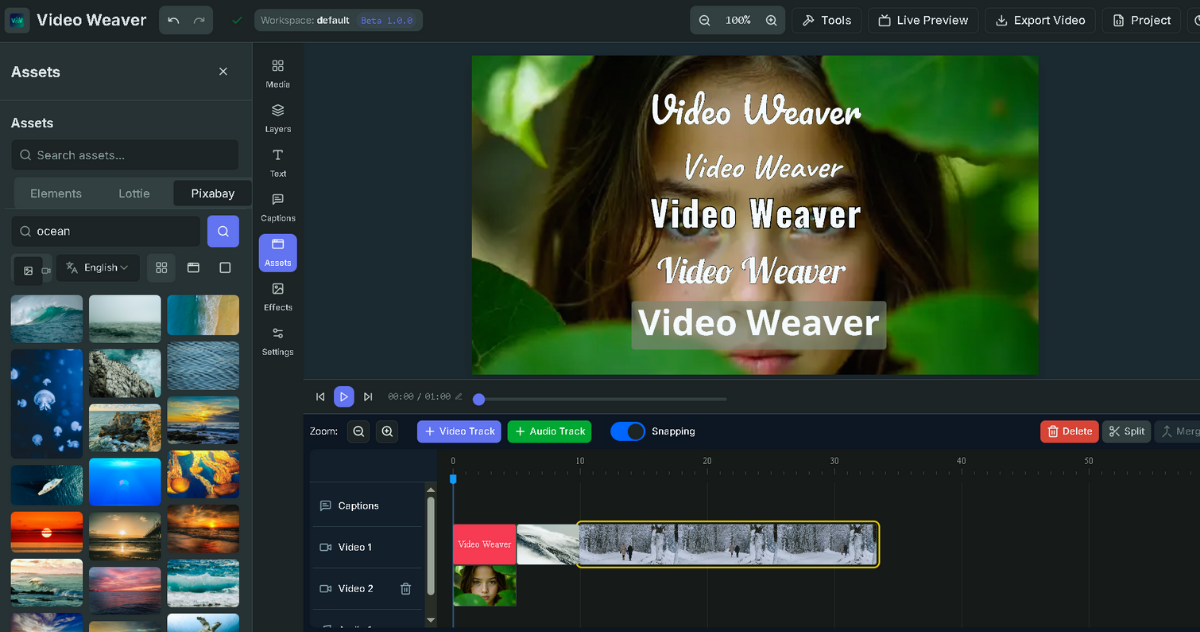
Initial public beta release of Video Weaver, implementing core timeline editing features and tutorial pages.
Features & Changes
- Initial public beta release of Video Weaver.
- Initialized project and tutorial pages.